
How to Find and Replace Text Online Using a Free Tool
Table of Contents
Introduction
Editing text manually can quickly become frustrating, especially when you are working with long documents, repeated words, or bulk content updates. Whether you are a writer correcting mistakes, a student editing assignments, or a developer modifying text-based data, manually searching for each word wastes time and increases the risk of errors. This is where a find and replace text online tool becomes extremely useful.
Using a free online Find & Replace tool, you can instantly search for specific words or phrases and replace them across your entire text in just one click. No software installation, no signup, and no technical skills are required. In this guide, you’ll learn how online Find & Replace tools work, why they are essential, and how to use Questain’s free Find & Replace tool effectively.
What Is Find and Replace?
Find and Replace is a text editing function that allows you to search for a specific word, phrase, or character and replace it with another word automatically. It is a common text editing function used in many editors, including word processors and online tools, as explained in the find and replace feature on Wikipedia. Instead of editing text line by line, the tool performs bulk replacements instantly.
The find and replace text online feature works directly in your web browser, making it accessible on any device. It is especially helpful when working with large text blocks where repeated changes are needed.
Why Use an Online Find & Replace Tool?
Using an online Find & Replace tool offers several advantages over manual editing or desktop software.
Key Benefits:
- Saves significant time when editing large text
- Eliminates human errors during repetitive edits
- Works instantly without downloads or installations
- Accessible on desktop, tablet, and mobile
- Ideal for writers, editors, students, and developers
Because the tool is browser-based, you can use it anywhere without worrying about compatibility issues.
How to Find and Replace Text Using Questain’s Free Tool
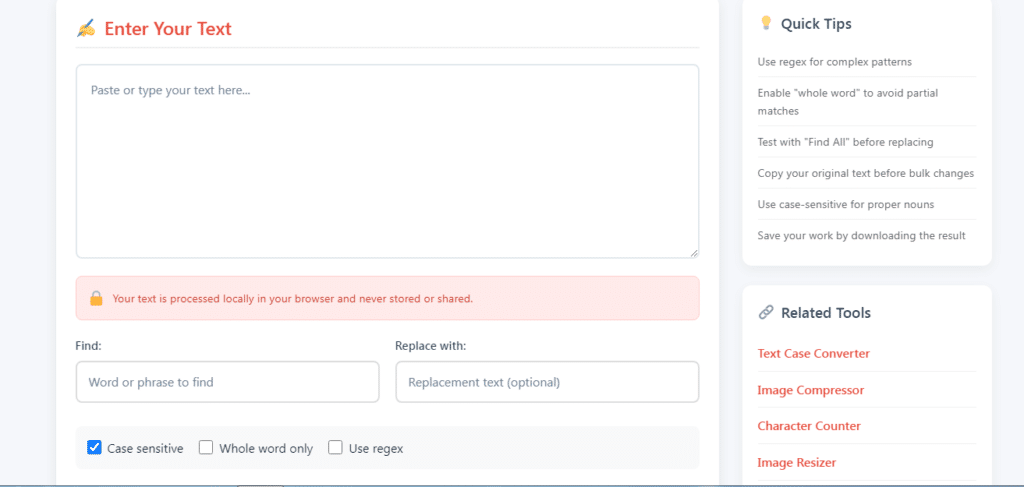
Questain’s free Find & Replace tool is designed for speed and simplicity. Follow these steps to replace text online instantly:
- Paste your text into the input box
- Enter the word or phrase you want to find
- Enter the replacement text
- Click the Find & Replace button
- Copy the updated text instantly
No signup, no installation, and no technical skills required.
👉 Try the free Find & Replace tool now on Questain.
Common Use Cases of Find & Replace Text Online
Writers and Bloggers
Writers often need to replace repeated words, update brand names, or correct spelling mistakes across articles. Using a free Find & Replace tool makes this process instant and accurate.
Students and Academics
Students can use Find & Replace to update references, correct formatting issues, or edit assignments efficiently without missing errors.
Developers and Programmers
Developers frequently use Find & Replace tools to modify code snippets, update variables, or clean copied text quickly without manual searching.
SEO and Content Managers
Content managers can replace outdated keywords, links, or phrases across large content blocks easily, improving workflow efficiency.
Find & Replace vs Manual Editing
Manual editing might work for small texts, but it becomes inefficient with longer content. A find and replace text online tool automates the process and ensures accuracy.
| Manual Editing | Find & Replace Tool |
|---|---|
| Time-consuming | Instant results |
| Error-prone | Accurate |
| Repetitive | Automated |
| Not scalable | Works for large text |
Is Questain’s Find & Replace Tool Free?
Yes. Questain’s Find & Replace tool is completely free to use. There are no hidden charges, no signup requirements, and no usage limits. You can replace text online as many times as you need.
Is It Safe to Use a Find and Replace Text Online Tool?
Security is a common concern when using online tools. Questain’s Find & Replace tool processes text directly in your browser and does not store or save user data. This ensures your content remains private and secure.
Additional Tools That Work Well with Find & Replace
For better productivity, you can combine Find & Replace with other free online tools:
- Word Counter – to check word count, characters, and reading time
- Text Case Converter – to format text into uppercase, lowercase, or title case
- Image Compressor – to optimize images for content publishing
Using these tools together can significantly improve content editing workflows.
Tips for Better Results When Replacing Text Online
- Double-check spelling before replacing text
- Replace one phrase at a time for accuracy
- Review the final output before publishing
- Use supporting tools like a word counter for validation
These small steps ensure error-free editing.
Find and Replace Text Online Instantly
Use our free Find & Replace tool to quickly search and replace words in your text. No signup required, works directly in your browser, and delivers instant results.
Conclusion
If you regularly work with text, a find and replace text online tool is essential for saving time and improving accuracy. Questain’s free Find & Replace tool provides a fast, reliable, and user-friendly way to search and replace text instantly. Whether you’re a writer, student, developer, or content manager, this tool can dramatically simplify your editing tasks.
👉 Use the free Find & Replace tool on Questain today.
FAQ
Q: What is a Find and Replace text online tool?
A Find and Replace tool allows users to search for specific words or phrases in text and replace them instantly using an online interface.
Q: Is Questain’s Find & Replace tool free?
Yes, the tool is completely free to use and does not require signup or installation.
Q: Can I replace multiple words at once?
Yes, you can replace repeated words or phrases throughout your entire text in one click.
Q: Is it safe to use an online Find & Replace tool?
Questain’s tool processes text securely in your browser and does not store user data.